Showing posts with label technology. Show all posts

Monday, April 12, 2010

Broken Blog and Other Things

If you've looked at my blog lately you've probably noticed it doesn't look quite right. The sidebars now have light text on a light background which makes them very difficult to read. Unfortunately, there's nothing I can do about it. It's happening because the colors are part of the template, and the template is drawing color blocks from other Web sites. Something must have happened to the page that has the sidebar color block. I've noticed it's happened before but it's always managed to fix itself. It's been several days now so maybe the break is permanent this time. The only way for me to fix it would be to put together a new template, and needless to say I don't have time to do that right now. So, I'm ignoring it. At least my posts are still readable.

In other news, this is how my hubby spends his time off:

Can you guess what this is?

That, my friends, is a pollen ball—pure pollen mixed with a little bit of water. After working seven days in a row this is how my hubby starts his day off, by making a pollen ball. I'm so proud.

Monday, January 25, 2010

Stumbling Into the 21st Century

I caved. Actually, hubby caved, I just drooled. Here's a picture of my new toy:

It's really Amazon's fault. As I mentioned in a previous post I'd been thinking about getting a smartphone, but after thinking about it and talking it over with my husband I decided not to get one for now. I kept thinking about it, though, which is odd for me once I've made a decision about something. I probably still wouldn't have one, though, if it hadn't been for Amazon.

Since our desktop computer died we had to replace it, and after two days of research I ordered a new one from Amazon last week. They said it wouldn't ship until mid-February; I didn't know why it would take so long but it was a good deal so we figured we'd live without a desktop until then. (I got a laptop when I started school so we weren't completely computerless.) Then, last Saturday, I got an e-mail from Amazon that said the following:

"Due to a lack of availability from our suppliers, we will not be able to obtain the following item(s) from your order... We've cancelled the item(s) and apologize for the inconvenience."

That meant we were back to square one with getting a new computer, so since we were planning on going out to run some errands on Saturday, anyway, we went to Best Buy to see what they had and talk to an actual person (which had been my original plan once upon a time, anyway). I hadn't thought about it but of course Best Buy is in the cell phone business now, and when we walked in the first thing we saw were all those phones. Hubby hadn't seen the Droid Eris himself yet so I showed it to him, and as I commented once again how pretty it was he said, "Let's get you the phone. Happy Birthday." (My birthday isn't for another six months so he just made that up.) Thanks to discounts and deals we ended up paying only half what I thought we would for the phone itself, and hubby ended up getting a free one for himself—all in all a pretty productive day. Since I've never used a smartphone before (or a touchscreen) it took me a couple days to figure out how it worked but I've gotten the hang of it now and am having lots of fun with it. And it's so pretty. 21st century, here I come!

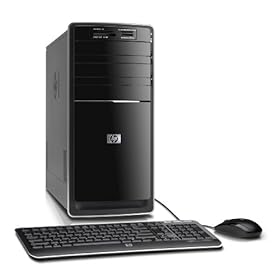
Oh, and we got the new computer, too: Best Buy ended up having the next model of the one I'd ordered from Amazon. The model I'd originally chosen came out last November (I think) and this newer model came out in January. It hasn't been in the stores very long (only a couple weeks, the salesperson thought) and it may not have even been on the Web site yet when I was looking at computers before. So we ended up getting an even faster computer with a ridiculously large hard drive (1 TB) for only a little bit more than the other one would have cost. Here's a picture of our shiny new computer:

Isn't it shiny? I've never had such a shiny desktop computer.

Unfortunately, hubby still can't play one of his games on it: Apparently that particular game requires a 3D video card, which the computer doesn't have. Interestingly, he's sure he played the game on the laptop before but it doesn't have a 3D card, either, and when we tried it gave the same error about the video card as the desktop. Oh well, we knew that might be the case. For now, enough is enough. We'll upgrade the video card on the desktop at a later date.

Wednesday, January 20, 2010

Goodbye, Part 2


Hubby had fun with the old computer last night. It's now an empty shell and a bucket of parts.

Monday, January 18, 2010

Goodbye to an Old Friend

Hubby and I are saying goodbye to an old friend this week. Well, not really a friend, and more like good riddance and no love lost, but definitely old. Our desktop computer has died.

When we took the computer to my school's IT department I asked them to not even look for the virus and just wipe the drive and rebuild the system. As I mentioned in the post about the virus I got the computer in 2002 (brand new and state-of-the-art then) so it was no spring chicken here in 2010. I used that computer to work from home for several years and it occurred to me there was undoubtedly all kinds of junk on it I hadn't been able to uninstall (mostly due to services related to databases and other corporate applications, I imagine), and a good wiping was probably just what it needed. The IT guys checked it out when we got there and said they'd be happy to work on it, but warned that due to its age they might have trouble reloading some of the hardware drivers (due to their not existing anymore). We said that was fine and left them to do their best.

Turned out the drivers weren't a problem. Or at least they don't know if they were. The person working on it never got that far: After reformatting the drive multiple times he couldn't reload the Windows XP operating system. He described everything he did to try to get it to work before calling me; I felt sorry for him going to all that trouble, but on the other hand he gets paid for all the work he did on it (since it's his job) so better him than me. He doesn't know what happened between the time we brought it in and when he started working on it but his guess is it's something physically wrong with the hard drive itself—the thing is just old and it wore out. (Happens to the best of us, eh?) Tomorrow hubby and I are going to pick up the computer to say goodbye... Or more like bring it home to take it apart and salvage some of its parts.

More importantly, now that the computer is a confirmed casualty it means we need a new one to replace it. I have a laptop I use for school but the desktop was our household computer (and the one hubby uses for everything), and frankly I'm just not comfortable having only one computer in the house now, sad as that sounds. We really don't need another laptop so we're getting a new desktop; desktops are a lot cheaper than laptops but they're also harder to find these days! My school bookstore doesn't even sell them (only laptops). I did some research and consulted with my dad (who knows a thing or two about computers) and I found one that will suit us just fine:
I ordered it from Amazon the other day. (They happened to have the one I was looking at for a cheaper price than where I originally found it.) It says it will take 2-4 weeks to ship so we won't get it until sometime in mid-February; I don't know why it'll take so long, maybe they have to build it from scratch or something. Oh well, we'll live with just one computer in the house until then and hubby will just have to use the laptop to check his e-mail when I'm not on it.

There is one happy result from all this. (Not that I consider any of this particularly "unhappy" other than the days I wasted trying to eradicate the virus myself). The new computer will have an updated video card (compared to the one from eight years ago) so hubby will finally be able to play some games on it. He has one particular game that he couldn't play on the old desktop due to the video card; he loaded it on the laptop and it works fine, but since I'm always on the laptop he never gets it for long enough to play it. With the new desktop he should be able to play it to his heart's content, and it opens up the possibility of getting more games in the future. (Can you say birthday present idea?) Not that hubby is a huge gamer and he doesn't have a lot of time to play them, anyway, but at least now he'll have the option to waste (I mean spend) some time playing some computer games if he wants to.

Thursday, January 7, 2010

The Virus

How to deal with a computer virus:
  1. Spend two days playing system administrator, running every virus and malware scan imaginable to try and track down something. Without knowing exactly what you're doing. Hope the computer still boots when you're done.
  2. Become immensely frustrated.
  3. Order pizza.
  4. Buy an external hard drive to backup data to prepare the computer to have its drive wiped.
  5. Take the computer to NC State University's IT department and let them deal with it.
I haven't actually done step #5 yet but that's next. We have two computers in our house: A laptop we got for me to use for school and a desktop I've had since 2002. Even though the desktop is archaic by computer standards it works fine for our purposes, particularly since I have the laptop to use for newer, space-hog and memory-intensive programs. About a week ago the desktop started notifying us that the virus definitions hadn't been updated in over 14 days. Then when I tried to run LiveUpdate (which should be running automatically) nothing happened. (The desktop uses an old copy of Symantec Anti-Virus. It did its job just fine until recently!) Finally, when I tried to go to the Symantec Web site in any browser it failed (with different errors depending on the browser). Further testing revealed I couldn't get to the McAfee site, either, and clicking on Google links to anti-virus related sites were often redirected. Eventually it dawned on me these were all probably signs of a virus.

This was supposed to be my week "off." I thought I'd finally have time to attack various things on my list that never get done, and start working on my capstone project for this semester. Instead, with classes starting in only three days, my list is virtually untouched and I'm feeling way behind where I wanted to be with the project. Instead of working on those things I lost two days of my life to a computer: Not sitting in front of it getting work done like I'd planned, but attempting to deal with the first computer virus of my computing life. (Since my dad worked with computers we had computers in our house way before it was fashionable to do so. I've been around home computers for a LONG time.) Suffice it to say I was completely unsuccessful in my attempt, other than last I checked the computer still booted. (This is a good thing.)

Thanks to being a student I can take the computer to my school's IT department and let them try to fix it, which will most likely mean wiping the drive, reinstalling the operating system and starting from scratch. The computer has been through a lot in the seven-and-a-half years I've owned it so a good wiping probably isn't a bad idea. Eventually we'll replace the desktop computer with something newer, but at least this will allow us to put it off a little longer.

Friday, December 18, 2009

Finished!

Last night I finished my last paper for the semester and turned it in. All 7,000 words of it. 41 minutes before it was due. For a professor whose wife was about to go into labor (if she hadn't already). I am completely wiped out.

Thanks to all of you who commented on my last post about the cell phone dilemma. Even with my small, couldn't-possibly-apply-to-a-larger-population sample size, it's interesting that none of you really do the smartphone thing. I had lunch with a friend this week and asked her about it, too; turns out she lives in the '90's as far as cell phones are concerned, too, just like me. I even made it to a mall this week (first time I've been to one in months, I think), and I went to a Verizon Wireless store and looked at the phones and asked about the whole pricing thing. The salesperson was very helpful and answered my questions without pushing me at all (I was really impressed with that, by the way), but the bottom line is we've decided not to change our cell phone situation at this time. I just can't justify the monthly price and I'm not "plugged into" things enough to really make it worthwhile, I think. So we'll stick to our basic plan and our phones that we use just for calling people (and frankly I hardly even use mine much for that). Maybe we'll revisit the issue again in another year.

I'll try to post more updates over the next few days, but given that Christmas is only a week away and I haven't had time to do much about it yet I'm expecting to be kind of busy for the next week. (When I'm not sleeping, which I may be doing a lot of due to being totally exhausted.) For example, you know that wonderful Christmas tree we got over a week ago? It still isn't decorated. Writing papers took precedent and hubby was out-of-town for a few days so we've just had a pine tree living in our house. It's pretty sad. The plan is to finally get it decorated tonight.

"Happy Christmas to all, and to all a good night!"

Monday, December 14, 2009

To Phone or Not to Phone

Lately I've been thinking about getting a new cell phone. This one looks nice:
Droid Eris

I've never had a smartphone and I keep debating whether it's really worth it. After all, one of the reasons to have a mobile phone is because you're mobile, and I'm definitely not; these days when I'm not in class I'm usually at home (working on homework, of course). We still have a landline (yes, totally 80's or 90's or whatever, I know) so that's another factor: If we start paying for a fancy phone plan (that whole data thing I haven't entirely figured out yet) I wouldn't want to keep paying for a landline, too, especially since we hardly use it, anyway. I know a phone like the iPhone or the Motorola Droid is so much more than just a phone, but having never had more than "just a phone" I'm not really sure what I would do with it. I know whatever I got would have all those cool apps... But do I really need them? It's hard to know if something I've never had will make my life better or just be yet another thing to waste my time and money on (neither of which I have very much of these days as a full-time graduate student, of course).

So the debate in my head (and discussion with my husband) continues. I'd love to hear from those of you who have smartphones and find them useful: What do you use them for? What features do you like the most? Have they simplified your life in some way? How do you justify the cost of the monthly plan?

Maybe someday I'll join the 21st century when it comes to phones. Until then, to phone or not to phone—that is the question. [Yes, that was totally cheesy. My apologies to Shakespeare. I've been writing way too many papers for school lately and I really need a break.]

Saturday, August 15, 2009

Computer Problems

UGH!

I was planning on having such a productive day today: Updating this blog, posting to another one, cleaning up the rest of my e-mail, maybe even doing some vacuuming and ironing for once. Instead, I dealt with computer problems for the majority of the day.

Yesterday I spent nine hours logged into a virtual private network (VPN), downloading files from one server to another. (I'll talk about why I did that in another post someday.) Everything seemed to go fine; the application I was using to download the files crashed every so often and I had to keep restarting it but the person I was working with said that was to be expected. The VPN was stable and never dropped, though, which was a huge plus. The download still hadn't finished by 11:00 at night so I figured I'd let it run some more today and hopefully it would finish then. (Unfortunately the download is blind for me: I can see how much is downloaded to the target server but I can't see how much of the total it's done or how much it has to go. The application is definitely lacking in the feedback area, if you ask me!)

This morning I went to the vet to pick up a refill of some medicine for my cat, then I came home and thought I'd get some work done on the computer. I turned on my laptop that I use for everything these days, it booted normally, and I waited for the network to connect for Internet access... but it never did. I figured our Internet provider may have reset things on their server as they sometimes do so I reboot the modem and the router, then reboot the computer; still no connection. We also have a desktop computer so I turned that on to see if the Internet worked there; it did so that proved it wasn't a problem with the ISP. I attempted to connect the laptop directly to the modem (bypassing the router); still no connection. After trying a few other things I narrowed it down to being a problem somewhere in the laptop itself: It was as if there was some switch in there telling the network adapters (wireless and LAN) not to turn on. I'm no system administrator (and don't want to be!) but whenever these things happen I learn more about the inner workings of computers than I ever wanted to know. Using the working Internet on the desktop here are some of the rabbit trails I followed today:
  • tunnel adapters
  • TCP/IPv6
  • ipconfig
  • netsh
  • BIOS
(I'm guessing most of you reading this don't know what most if not all of those things are. If so don't worry, count your blessings and hope you never need to know.)

After SEVEN HOURS of failing to fix the problem (and becoming pretty frustrated and agitated with the thought of having to take my computer to a repair place and leave it for a few days) I finally read a post in a forum that happened to talk about a setting in the BIOS... Once I found the BIOS in my Windows Vista computer I found the setting, which was indeed turned off (disabled). I turned it on (enabled) and to my total surprise the network connected and I had Internet access—just as I was about to give up and take it to the repair place. So what was that setting in the BIOS? "Internal Network Adapter Boot" (or something like that). Apparently Windows Vista (which is on my laptop) has a BIOS setting that has to be enabled for the network adapters to "turn on" during the boot process; if that setting is disabled the computer boots up without them and the network can't connect. The fact that Windows still recognized the adapters and said they were enabled didn't help things during my problem-solving endeavor.

I have no idea how that setting got turned off but given the variables I'm working with I suspect it has something to do with the VPN and the process surrounding downloading those files. (Which I'm continuing to do as I write this, in fact, and it still isn't finished... It's V E R Y slow over the VPN.) And I'm still having problems: After we got back from dinner (I decided I needed to go out to dinner after all this) I turned on the laptop and the network connected but not the Internet. Thankfully rebooting the modem and router worked this time and it connected again.

At this point I'm afraid to see what tomorrow might bring. Maybe I should rethink my career path and become a system administrator after all!